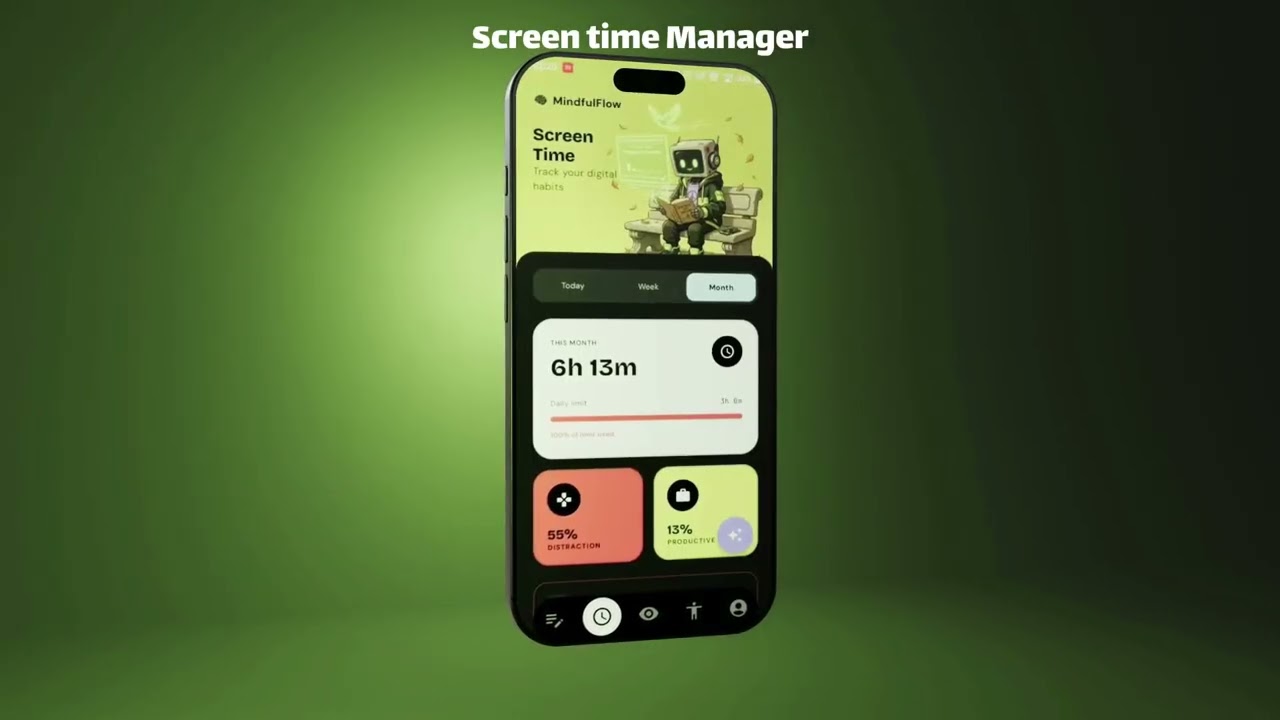
Building this for real users, not just a poster. [Take the 2-minute survey](https://forms.gle/sE9AXgJeyEBTNoVz8) and help shape what ships next.
// The Origin: Why build another screen time app?
This project is my brainchild, born from watching how many people—especially youth and children—waste their valuable time and energy doomscrolling. Modern social media algorithms are engineered to optimize for engagement, often making toxic behavior and negative emotions look "cool" just to keep users hooked. The physical and psychological harms of this addiction triggered me to create a solution. I didn't want to build just another dumb app blocker; those just cause frustration and are easily bypassed. I wanted an active countermeasure with a personal feel—something that gives users a scientifically proven reason, and a better alternative, every single time they try to open a social app out of pure habit. What follows is a full walkthrough of what MindfulFlow actually does today: how it tracks your physical wellbeing, how it plans your day with you, and how it steps in — thoughtfully, not punitively — when your actions drift from your own intentions.
Want to see it in action? [Watch the full demo video here](#) or [download the latest Android APK](#).
// The Interface: What does it look like?
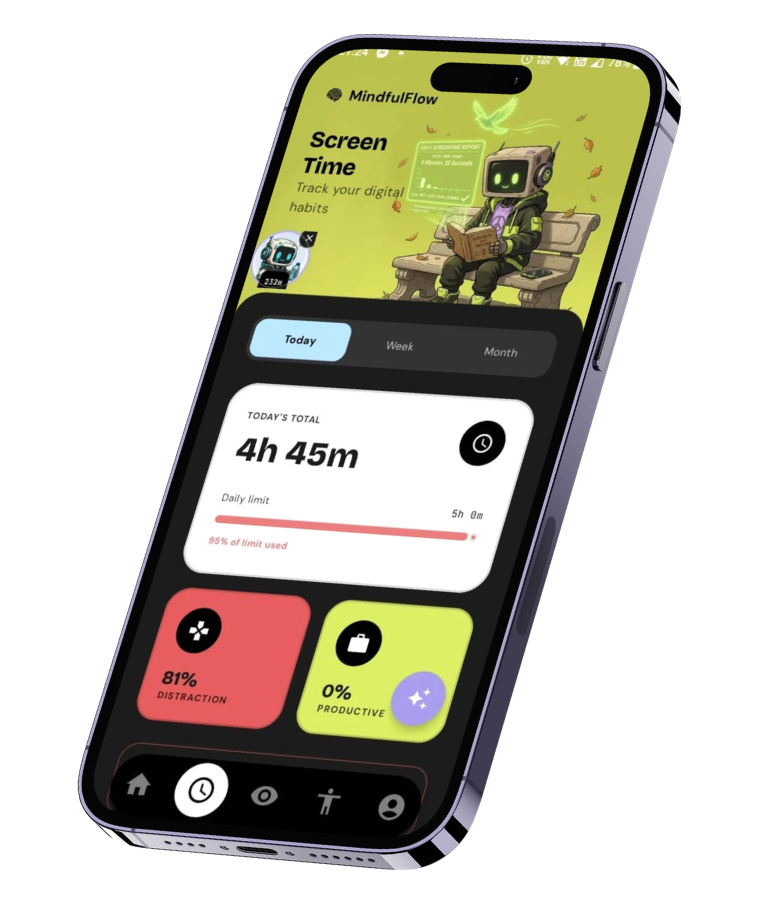
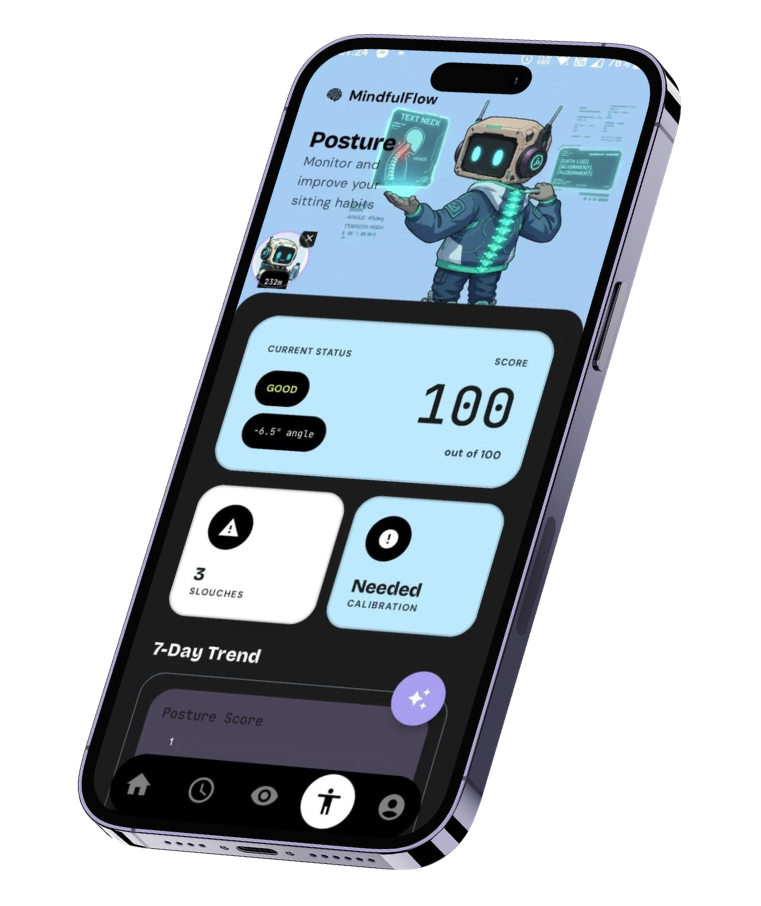
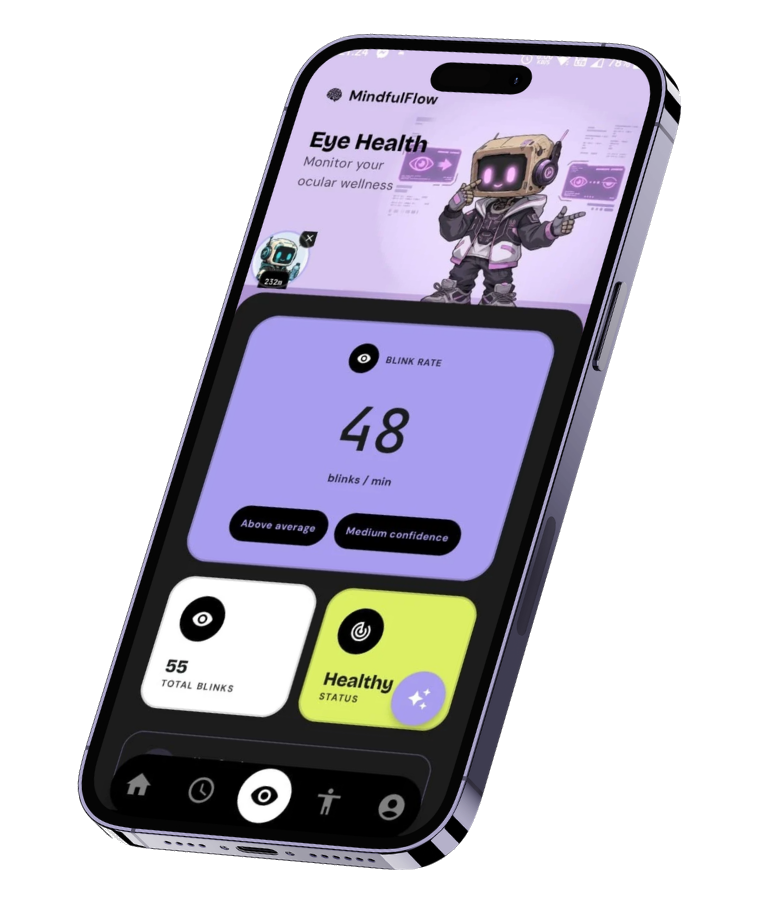
The interface is designed using a custom "Cyber-Arctic" dark theme built natively in Jetpack Compose. Instead of nesting insights deeply within endless settings pages, everything is exposed cleanly via an intuitive Bento-box layout and floating system-level overlays. The Home tab is a calendar-centric journal, Screen Time surfaces daily usage analytics, and dedicated Eye Health and Posture tabs turn raw sensor data into something genuinely readable at a glance.
// Does running continuous camera scans drain the battery?
This was one of the biggest engineering hurdles. Keeping an Android front-facing camera powered on indefinitely will rapidly drain the battery and cause the phone to overheat. To solve this, MindfulFlow relies on strict camera duty-cycling handled by a persistent `ContextEngineService`. Instead of running the camera permanently, it utilizes a lightweight 5-second polling loop to evaluate app usage. The actual camera analysis is restricted to short, strategic windows (15 seconds ON, followed by a variable OFF duration). Furthermore, this is completely **motion-gated**—if the IMU sensors detect that the phone is perfectly stationary or face-down, the camera framework is instantly put to sleep.
// Are the posture and blink rate metrics actually accurate?
Tracking posture with a phone camera is notoriously unreliable because the phone itself is constantly moving. If you lie back on a couch, a standard face-detection algorithm will incorrectly assume you are looking straight up at the ceiling. To fix this, I engineered a **Posture Fusion Engine**. It calculates an absolute head angle relative to the world frame by mathematically isolating the phone's movement from your skull's movement. It queries the ML Kit Face Detection API for your head pitch ($Camera\ \theta_x$) and subtracts the hardware IMU Rotation Vector sensor ($IMU\ \theta_{tilt}$) using this core formula: $P_{abs} = Camera\ \theta_x - IMU\ \theta_{tilt} - 90^\circ$ This establishes a "True Horizon," making the posture tracking immune to device tilt. This is combined with a 468-point face mesh that tracks your Eye Aspect Ratio (EAR) to compute a highly accurate Blinks-Per-Minute (BPM) value. Every threshold used to classify posture as Good, Fair, or Poor is grounded in published cervical spine loading research, not an arbitrary guess.
// Calculates absolute head pitch independent of phone tilt
fun calculateTrueHorizon(cameraEulerX: Float, imuTiltAngle: Float): Float {
    // Fuses camera pitch and physical device rotation vector
    val absolutePitch = cameraEulerX - imuTiltAngle - 90f

    // Apply motion-gated debouncing to prevent flickering states
    return applyHysteresis(absolutePitch)
}
// Why does digital wellness need AI, and why does it start with journaling?
Standard screen-time limits fail because they're entirely punitive and entirely blind to context. A timer hitting zero doesn't know whether you're on a deadline, whether you genuinely have free time right now, or what you actually meant to be doing instead — it just blocks, your brain craves the interrupted dopamine loop, and you immediately look for a way around it. MindfulFlow's answer to that is to give the app real context to work with, and the foundation for that context is a **structured, timeboxed daily journal** — not a free-text diary, a planner the app can actually reason about. Every morning, you lay out your tasks: a title, a duration, an optional time slot, and whether it's something you want to actively protect with a focus session. In the evening, a short reflection asks what got done, what didn't, and what got in the way. This structure is deliberate, and it's grounded in real behavioral research rather than intuition: - **Timeboxing** — giving a task a hard boundary counteracts Parkinson's Law: work expands to fill the time allotted to it. A task with no end time has nowhere to end. - **WOOP (Wish, Outcome, Obstacle, Plan)** — Gabriele Oettingen and Peter Gollwitzer's research on Mental Contrasting with Implementation Intentions shows that pairing a goal with a concrete "if this obstacle happens, then I'll do this" plan produces measurably stronger follow-through than positive thinking alone. - **Task specificity** — a vague task like "study" can't be meaningfully timeboxed, so the app nudges toward something concrete, like "Review Chapter 4 flashcards," because specificity is what makes a plan actionable instead of aspirational. This is also where **Neo**, the app's AI coach powered by Gemini, actually earns its place instead of just being a chatbot bolted on the side. Tap "Help me plan my day," list your rough tasks — even vague ones — and Neo returns a structured schedule, never open-ended chat text you have to interpret yourself. The system prompt behind it encodes the same research as hard rules: never schedule more than 60–70% of the day, since a fully packed schedule just produces stress and a broken plan by 11am; no single focus block over 90 minutes, since sustained attention has a natural ceiling; a vague task gets one clarifying question before it's ever given a time slot; and if there are more tasks than reasonably fit, Neo flags the overflow and asks what actually matters most today, rather than quietly cramming everything in. Every suggested task also carries a small "Why here?" note — one or two plain-language sentences on why it landed where it did — so the schedule teaches you something about your own day, not just hands you one.

// How does the intervention system actually work?
This is the heart of the project, and the part I iterated on the most. Early experiments used a single, fixed friction pattern that simply got longer each time you ignored it — a few seconds became a few seconds more. It interrupted the scroll, but it taught exactly the wrong lesson: within days, dismissing it became pure muscle memory, the same autopilot behavior it was supposed to interrupt in the first place. A friction pattern that never changes shape stops being friction. It becomes furniture. So the system that actually ships varies **what kind** of friction shows up, not just how long it lasts, escalating through five tiers per app, per underlying obstacle, over the course of a day: | Tier | Mechanism | Why this, specifically | |---|---|---| | 0 | A brief pause-and-confirm before the app even renders | Intercepting the launch itself, before content loads, is where the research shows the biggest effect — a short pause-and-dismiss step alone has been shown to cut app opens by over half | | 1 | A passive grayscale filter, applied for the rest of the day | No button to dismiss, so nothing to habituate to. It quietly removes the visual reward signal from the app itself | | 2 | A required, specific typed reflection — "What's actually pulling you in right now?" | Typing a real answer forces genuine reflection in a way a tap never will | | 3 | A short, capped AI check-in with Neo — two or three exchanges, never a lecture | Saying your reasoning out loud, to something that responds, is a stronger self-check than typing into a void | | 4 | The app is paused for the rest of the day | The final step, reached only after every lighter nudge that day has already been tried | Even the last tier isn't a true lock-out. A single, honest override is always available — but reaching it means typing a real reason first, and it's logged distinctly rather than offered repeatedly. The goal was never to physically prevent access to your own phone; it was to remove the *reflexive* path back into it. Every route in costs a small, conscious moment of thought instead of a thumb on autopilot. Context changes the message, too. If you're mid-way through a scheduled focus block when you open a flagged app, the overlay doesn't guess — it tells you exactly what you planned and offers to start a focus session on the spot, because that's a far more useful nudge than a generic warning.
// The bypass ladder: mechanism escalates each time, not just duration
fun computeTier(bypassesToday: Int): Int = when {
    bypassesToday <= 0 -> 0   // pause-and-confirm
    bypassesToday == 1 -> 1   // passive grayscale, no dismiss action
    bypassesToday == 2 -> 2   // required typed reflection
    bypassesToday == 3 -> 3   // capped AI check-in
    else -> 4                 // paused for the rest of the day
}
// What if you just stay in the app instead of leaving?
An overlay that only fires when an app opens has an obvious blind spot: someone who gets past it once and then just stays for the next two hours never triggers it again. MindfulFlow closes that gap with the same lightweight background service that already tracks distraction time — it also watches for an active "stayed anyway" session, and issues gentle, capped check-ins that space out further apart the calmer the day has been, and closer together if you're already deep into that day's tier ladder. It stops after a few check-ins in a single sitting, on purpose — the point is a light tap on the shoulder, never a nag loop.
// Isn't a "focus mode" just another timer?
**Work Sessions** are the one part of the system that acts *before* temptation instead of reacting to it, and the research behind that ordering is some of the strongest in the whole project: deciding your response to distraction in advance, while you're calm, beats reacting to it in the moment almost every time. Start a session — either manually or automatically when a planned focus block begins — and MindfulFlow enables Do Not Disturb, blocks the apps you've flagged for the duration, and starts a countdown at 25, 50, or 90 minutes, the same block-length logic Neo uses when planning your day. Ending a session early isn't a single careless tap; it routes through the same typed-reflection step used elsewhere in the app, which turns quitting early into a deliberate choice instead of a reflex.

// Can you get true system-wide grayscale, like Digital Wellbeing's Bedtime Mode?
By default, no — and the reason is a genuinely interesting platform constraint. Real system-wide grayscale on Android sits behind the `WRITE_SECURE_SETTINGS` permission, which Google Play doesn't grant to ordinary third-party apps; Google's own Digital Wellbeing gets it only because it ships as a privileged system app. Rather than fake it, MindfulFlow does the closest honest thing: an in-app desaturation filter, tuned to actually look like reduced color rather than just a dimmer screen. That distinction matters more than it sounds — a dark tint reduces brightness but barely touches saturation, so a vivid color under a dark overlay still reads as vivid, just dimmer. Blending a true neutral gray instead pulls every color proportionally toward gray using nothing but alpha math, and the difference is genuinely noticeable. For anyone willing to do a one-time permission grant via a computer, there's also an opt-in advanced mode that toggles the real system setting, scoped precisely to the flagged app and switched off the instant you leave it — with a safety check built in so a crashed background service can never leave someone stuck in permanent grayscale.
// How do you measure progress without turning it into shame?
I was careful about one thing above almost everything else in the scoring design: the number a user sees should never be a comparison to a stranger, and it should never be raw screen-time hours. Both read as judgment, and judgment is exactly what pushes people to disable a wellbeing app rather than engage with it. So the Weekly Improvement Score is entirely delta-based — this week's self-override rate against last week's, this week's wellbeing trend against last week's — weighted toward behavior someone actually controls rather than raw usage, which unfairly punishes anyone whose day genuinely requires their phone. The one streak in the whole system tracks journaling consistency, not "stayed under budget," because a streak on usage quietly teaches people to set trivially easy goals just to protect the number. Showing up to reflect doesn't have that failure mode — and streak freezes exist specifically so one legitimately hard day doesn't erase weeks of consistency.
// Why does any of this matter beyond one indie app?
It's easy to frame "phone addiction" as a personal willpower problem. I don't think that framing holds up. The apps on the other side of this fight run product teams, A/B tests, and behavioral psychologists whose entire job is engagement optimization — the incentives are structurally lopsided, and the people most affected are disproportionately young, still building the self-regulation skills an adult brain has had decades to develop. A blunt app blocker doesn't fix that asymmetry — it just adds a second source of friction the user resents, on top of an algorithm engineered to route around exactly that kind of friction. What actually changes behavior, according to the research this whole system leans on, is closer to the opposite instinct: **autonomy-supportive design.** Help someone articulate what they actually want their day to look like. Reflect their own commitments back to them at the exact moment they're about to abandon them. Vary the friction so it never becomes invisible. Never remove the choice — just make the reflexive path to the bad choice a little harder, and the good path a little easier to fall into. That's a genuinely different bet than most of this category makes, and it's the reason I think this project is worth more than its GitHub stars. Digital wellbeing tools that lead with restriction tend to get uninstalled by exactly the people who need them most. Tools that lead with understanding — of your schedule, your patterns, your own stated goals — have a real shot at being something people keep, not something they quietly route around within a week.
// How technically backed is the architecture?
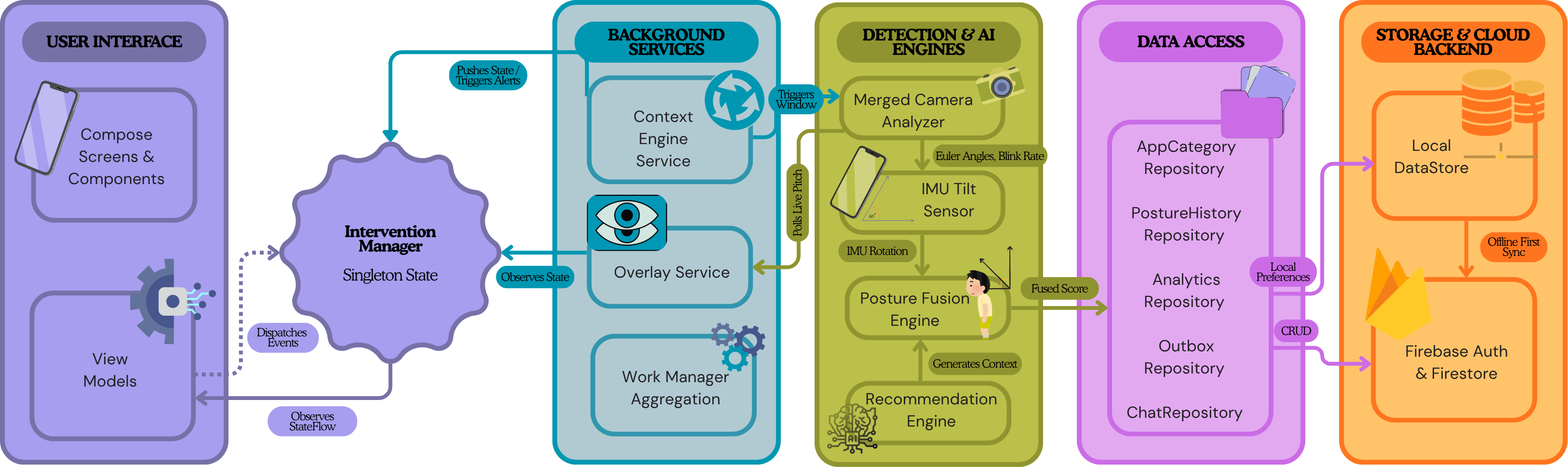
Because MindfulFlow processes physiological data and a genuinely personal daily journal, privacy and performance are non-negotiable. All machine learning pipelines run 100% locally on-device. Camera frames are processed strictly in volatile memory and destroyed immediately — no imagery is ever saved or uploaded. The architecture follows a single-activity MVVM pattern. `ContextEngineService` orchestrates the hardware sensors and distraction-time polling; `LaunchInterceptService`, an `AccessibilityService`, owns the moment an app is about to open; and `InterventionManager` is the centralized Kotlin Singleton serving as the single source of truth via `StateFlow` across all of it. The journaling layer follows the same local-first pattern as everything else — writes land on-device synchronously, so the UI never waits on a network call, then sync to Firestore asynchronously in the background. AI is deliberately kept off every time-sensitive path: it's invoked once, explicitly, when a user asks Neo for planning help — never in the split-second between an app opening and an overlay appearing, where a network call would introduce exactly the kind of lag that defeats the whole point. When connectivity drops, an asynchronous Outbox Repository queues daily aggregations and posture snapshots locally, draining seamlessly to Firebase Firestore once a connection is re-established.


// What's next?
A Weekly Improvement Score with a shareable recap card is next — entirely delta-based, and deliberately free of any raw screen-time shame metric — followed by small, opt-in friend-circle comparison, never a global leaderboard, since peer pressure from strangers has no real evidence behind it and plenty against it. Longer-term, I want Neo to close the loop fully: not just planning the day and stepping in during the moment, but noticing patterns across weeks — which obstacles keep beating which plans — and quietly getting better at helping without the user ever needing to ask.